


Chaptrs - Islamic Audiobooks
4.44.00 Reviews
App Specs
- Version
- 2.5.0
- Updated On
- License
- Free
- Downloads
- 100,000+
- Developer
- Chaptrs Media LTD
- Categories
- Books & Reference
- Platform
- Android
Screenshots
 Analysis by AppCompare
I’m drawn to Chaptrs because it puts listening, rather than reading, at the center of exploring Islamic books and teachings. That is a useful distinction for anyone whose day is already full of reading on a screen. It can make a walk, a commute, or a quiet stretch at home feel like a more natural time to learn. I’d treat it as a focused listening companion, though, not a substitute for every kind of Islamic reference: audio works best when I can give the speaker my attention, and it is less convenient than text when I need to scan, compare, or quote a passage.
Who is likely to get the most from it?
I’d recommend trying Chaptrs if you already enjoy audiobooks, want Islamic material in an audio format, or are more likely to finish a book by listening than by setting aside time to read. Its Books & Reference focus gives it a clearer purpose than a general audio app, while its free download makes it easy to see whether that style fits your routine. Chaptrs is developed by Chaptrs Media LTD, and its Everyone age rating makes the stated audience broad rather than limited to adults.
The app has a 4.4 average from around 366 ratings and over 100,000 installs, which suggests that it has found listeners beyond a tiny early audience. I wouldn’t use those figures as a guarantee that every title will suit me; the more useful test is whether I can find material I want to hear and whether the listening format supports the way I learn. The current version is 2.5.0, and the app is listed for devices running Android 7.0 or later.
How I’d fit listening into a real day
For a practical routine, I’d choose one title or playlist before leaving home rather than browsing while walking or driving. I could use a short trip for a section of a longer work, then return to the same point later if bookmarks make it easy to keep my place. On a longer walk, a themed playlist could take the decision-making out of choosing the next listen. The trick is to make the listening session intentional: pick a topic, keep a note of questions to revisit, and don’t assume that hearing something once means I have absorbed it.
That approach also helps with a key trade-off. Audio is convenient when my hands and eyes are busy, but it is not ideal for careful study if I’m likely to be interrupted or need to check a name, quotation, or argument. I’d listen first for the overall explanation, then use a book or trusted written reference when precision matters. That combination is more useful than expecting one app format to do both jobs equally well.
Where it sits beside other listening options
Compared with a broad audiobook service, Chaptrs has a more specific religious focus, which can save time if Islamic listening is what I’m looking for. A general service may be a better fit if I want fiction, non-religious nonfiction, and Islamic titles together in one library. Podcasts can be more conversational and episode-based, while audiobooks are usually better when I want to follow a sustained subject. For quick fact-checking, a searchable digital text or reference work is often faster than scrubbing through audio.
I’d also keep expectations grounded when choosing between audio and a printed or digital book. A spoken narration can make a long work easier to approach, but it does not automatically provide the visual structure that helps me compare chapters or revisit a precise paragraph. If I’m studying a topic in depth, I’d use Chaptrs to build familiarity and pair it with a text source for close reading. If I simply want to spend a spare half-hour listening to relevant material, the audio-first approach is the point.
Worth Reading Before You Choose

EA SPORTS FC Mobile 26 Is a Bigger Football Game, but It Takes Time

Flipboard Shows What News Apps Must Do Beyond the Feed

Switching to Android Auto Means Rethinking Your Driving Routine

Google Calendar Makes a Crowded Week Easier to Manage

Ludo King Makes the Most of the Minutes Between Plans

Baby Panda World Brings Quick Play to Modern Phones, but Its Game Library Feels Busy
One small habit that makes listening more useful
Rather than treating playlists as background noise, I’d use them as a light study plan: choose a theme, listen to one selection at a time, and pause afterward to recall the main idea in my own words. A bookmark can help me return to a passage that deserves another listen; a personal playlist can group titles I want to revisit without relying on memory. These habits are especially useful when I’m listening in short bursts, since they turn otherwise disconnected sessions into a thread I can follow.
Playback speed is another setting I’d adjust with care. A faster pace can help when revisiting a familiar explanation, but for new or nuanced material I’d keep the narration comfortable enough to follow. Offline downloads are handy when I expect an unreliable connection, but I’d prepare before leaving rather than count on being able to browse or download while travelling. Those are simple choices, yet they make the app more practical without asking it to replace focused reading.
Hey there! If you're on the lookout for an app that brings a world of Islamic audiobooks right to your fingertips, then let me introduce you to Chaptrs. This app might just be the companion you didn’t know you needed for your daily dose of spiritual and educational content.
Diving into Chaptrs
So, what exactly is Chaptrs all about? Picture this: an entire library of Islamic audiobooks that you can access anytime, anywhere. Whether you’re commuting, relaxing at home, or taking a walk, Chaptrs allows you to immerse yourself in rich Islamic literature without having to flip a single page. Isn’t that cool?
User Interface and Experience
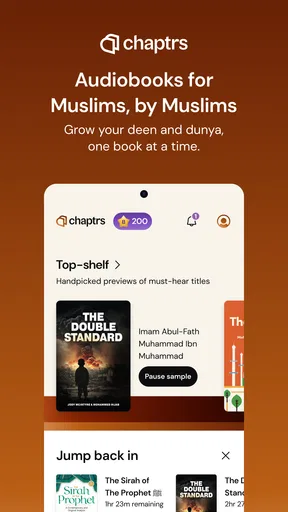
First off, the user interface is sleek and intuitive. You open the app, and bam, you’re greeted with a clean design that’s super easy to navigate. The library is organized neatly, so finding your next listen is a breeze. Just a few taps and you’re good to go.
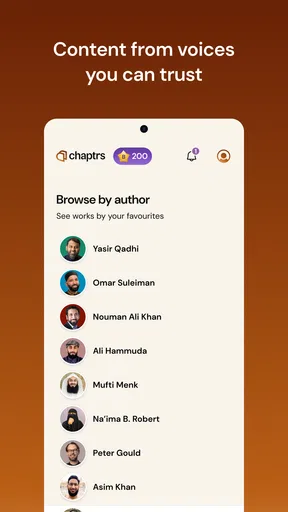
I found the search function really helpful. You can look up specific titles, authors, or genres, and the app does a great job of pulling up exactly what you’re searching for. It’s like having a personal librarian right in your pocket!
Content Variety
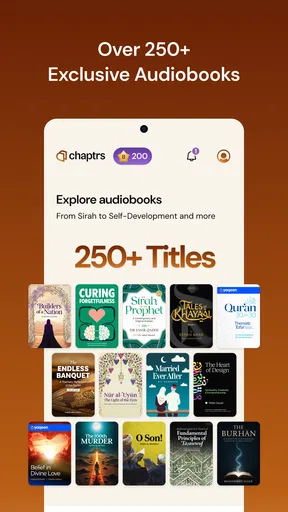
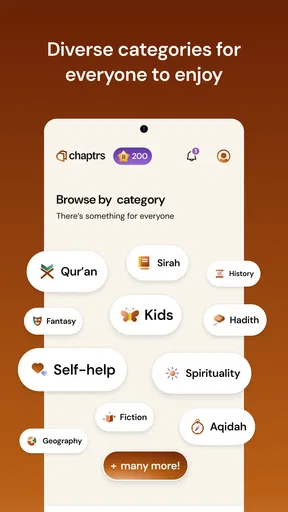
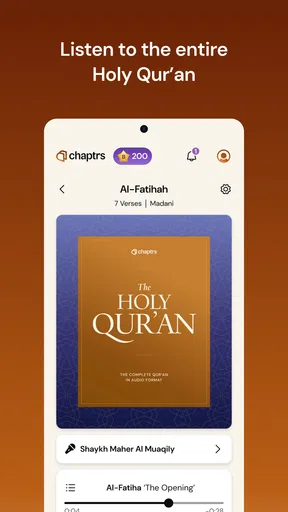
Now, let’s talk about the content because that’s where Chaptrs truly shines. The app boasts a wide variety of audiobooks covering everything from Quranic recitations and Hadiths to historical narratives and contemporary Islamic thought. Whether you’re a scholar or just someone curious about Islamic teachings, there's something for everyone.
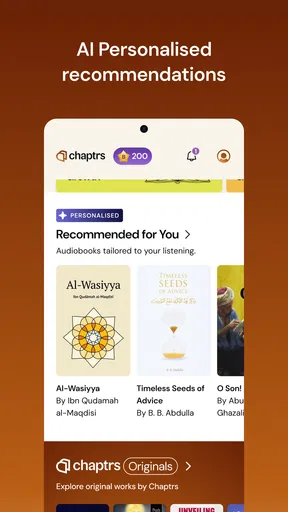
One feature I really dig is the curated playlists. These are collections of audiobooks based on themes or topics. So, if you’re in the mood for something specific, like spiritual growth or Islamic history, you can just dive into a playlist and let the knowledge flow.
Audio Quality
Let’s not forget about the audio quality, which is top-notch. The narrations are clear and the audio is crisp, making it a pleasure to listen to. Plus, you can download audiobooks to listen offline, which is perfect for those long flights or road trips where Wi-Fi might be a bit iffy.
Personalization Features
Chaptrs also lets you personalize your listening experience. You can adjust playback speed, set bookmarks, and even create your own playlists. This customization is a game-changer, especially if you’re someone who likes to revisit specific sections or listen at a pace that suits your learning style.
Community and Updates
One of the things that pleasantly surprised me is the community aspect of the app. Chaptrs often updates its library with new releases, and there’s a section where users can recommend books or suggest features. It’s great to see an app that’s actively engaging with its user base and continuously improving.
They also have a feedback mechanism where you can share your thoughts directly with the developers. It feels like being part of a community that’s passionate about spreading Islamic knowledge.
Final Thoughts
So, is Chaptrs worth a download? Absolutely! If you’re keen on exploring Islamic literature in a hassle-free, on-the-go format, this app is a must-have. It’s user-friendly, content-rich, and offers a personalized listening experience. Chaptrs makes learning and spiritual enrichment both accessible and enjoyable.
Why not give it a try and see for yourself? You might just find it to be the perfect addition to your daily routine. Happy listening!
Costs and choosing a sensible starting point
The app is free to install, but it also offers in-app purchases ranging from $3.99 to $89.99 per item. I’d make that distinction clear before building a routine around it: free entry does not necessarily mean every title or listening option is included at no cost. If I’m trying it for the first time, I’d browse first, decide which material I actually want, and check the purchase details shown in the app before paying. That avoids treating a broad library description as a promise that every selection is free.
For a new listener, I’d begin with a subject I already care about rather than trying to sample everything. A familiar topic makes it easier to judge narration and pacing, while a short listening session helps me tell whether audio is comfortable for focused learning or mainly works as a background companion. If I enjoy it, I can then use playlists and bookmarks to build a more deliberate routine instead of making a purchase simply because a title looks interesting.
Limits worth weighing before settling in
The main limitation is inherent to the format: spoken material can be difficult to skim. Search is useful for locating titles, authors, or genres, but it does not make a narrated book as quick to consult as a page of text. For a precise religious question, I’d rather verify the wording and context in a reliable written source than rely on memory of an audio passage. Chaptrs seems most valuable for listening and sustained learning, not as an instant answer tool.
There is also a practical difference between having audio available and being ready to listen. Offline downloads help when a connection is poor, but I’d select and download what I need while I have dependable access. Likewise, a playlist can guide a session but can’t decide whether a particular book is authoritative or appropriate for my purpose. I’d still choose titles thoughtfully, especially when exploring unfamiliar teachings or historical claims.
Readers who prefer to annotate, compare translations, or move rapidly between references may be happier with ebooks or a dedicated digital library. And if Islamic content is only an occasional interest alongside many other audiobook genres, a general-purpose service may make more sense as the main subscription or library. Chaptrs is a better fit when the focused subject matter itself is a reason to open the app.
My verdict for everyday listeners
Chaptrs makes the strongest case for itself when I want Islamic books and ideas to fit into the spaces between other parts of the day. Its audio-first approach, themed playlists, offline listening, adjustable speed, and bookmarks give me several ways to shape a session around my attention and schedule. I’d use it for exploration, revisiting a passage, or turning a regular walk into listening time—not as a replacement for close reading or careful source checking.
Overall, I think it is worth trying if you want a dedicated place for Islamic audio and are comfortable checking which content carries an extra cost. If you need a searchable text reference, broad non-religious audiobook selection, or a tool for detailed study, another format will serve you better. For the listener who wants a focused, convenient way to hear Islamic material in ordinary daily moments, Chaptrs is a thoughtful option, with the best experience coming from choosing titles deliberately and listening with a clear purpose.
Pros
- Wide selection of Islamic audiobooks.
- User-friendly interface and navigation.
- Offline listening available.
- Regular updates with new content.
- High-quality audio playback.
Cons
- Limited customization options.
- Requires internet for initial download.
- Ads can be intrusive at times.
- Subscription needed for full access.
- No dark mode for night reading.
FAQs for Chaptrs - Islamic Audiobooks
What is Chaptrs - Islamic Audiobooks?
Chaptrs - Islamic Audiobooks is an application designed to provide users with access to a wide range of Islamic audiobooks. It offers a diverse collection of religious texts, lectures, and educational content, allowing users to listen and learn on-the-go. The app is user-friendly and includes features such as bookmarking and adjustable playback speeds.
Is Chaptrs - Islamic Audiobooks available for both Android and iOS devices?
Yes, Chaptrs - Islamic Audiobooks is available on both Android and iOS platforms. Users can download the app from the Google Play Store or the Apple App Store. This cross-platform availability ensures that users with different devices can access its comprehensive library of Islamic content.
Does the app require an internet connection to use?
Chaptrs - Islamic Audiobooks requires an internet connection for initial downloads and updates of the audiobooks. However, once content is downloaded, users can listen offline, making it convenient for those who may not always have internet access. This feature is particularly useful for travel or areas with limited connectivity.
Are there any subscription fees or in-app purchases associated with Chaptrs?
Chaptrs offers both free and premium content. While some audiobooks are available for free, others may require a subscription or one-time purchase. Users can opt for a premium subscription to access the full library, remove ads, and unlock additional features, enhancing the overall listening experience.
How can I contact customer support if I encounter issues with the app?
If you encounter any issues while using Chaptrs - Islamic Audiobooks, you can reach out to their customer support team through the app itself or via their official website. Look for the 'Help' or 'Contact Us' section within the app to submit queries or report problems for prompt assistance.


